
Dev Partner AWS Access: Accounts, SCPs, No Root
You have hired an outside team to work on a platform that already earns money. They need AWS access on day one. The question is how much, and how you take it back on the last day.
The usual advice is to put the partner in their own AWS account inside your Organization. That advice is right. It is also where most guides stop, and the gap between "separate account" and "safe separate account" is where the real risk sits.
Start with an account per environment
If you have not already done so, turn your AWS account into the management account of an AWS Organization. Then create member accounts for the work the partner will do: one for staging, one for production, and a sandbox if they need room to experiment.
This gets you three things for free. Every pound the partner spends lands on its own line in consolidated billing. Nothing they do can touch resources in your other accounts. And when the engagement ends, you close or reassign the account instead of auditing a tangle of IAM users in your main one.
Here is what that looks like in our own Organization. Client work sits in its own OU with one account per client environment. Our own estate sits under a separate OU, split into Infrastructure, Non-Production, Production, Security and a sandbox. SCPs attach at the OU level, so the client OU gets its own guardrails without touching ours.
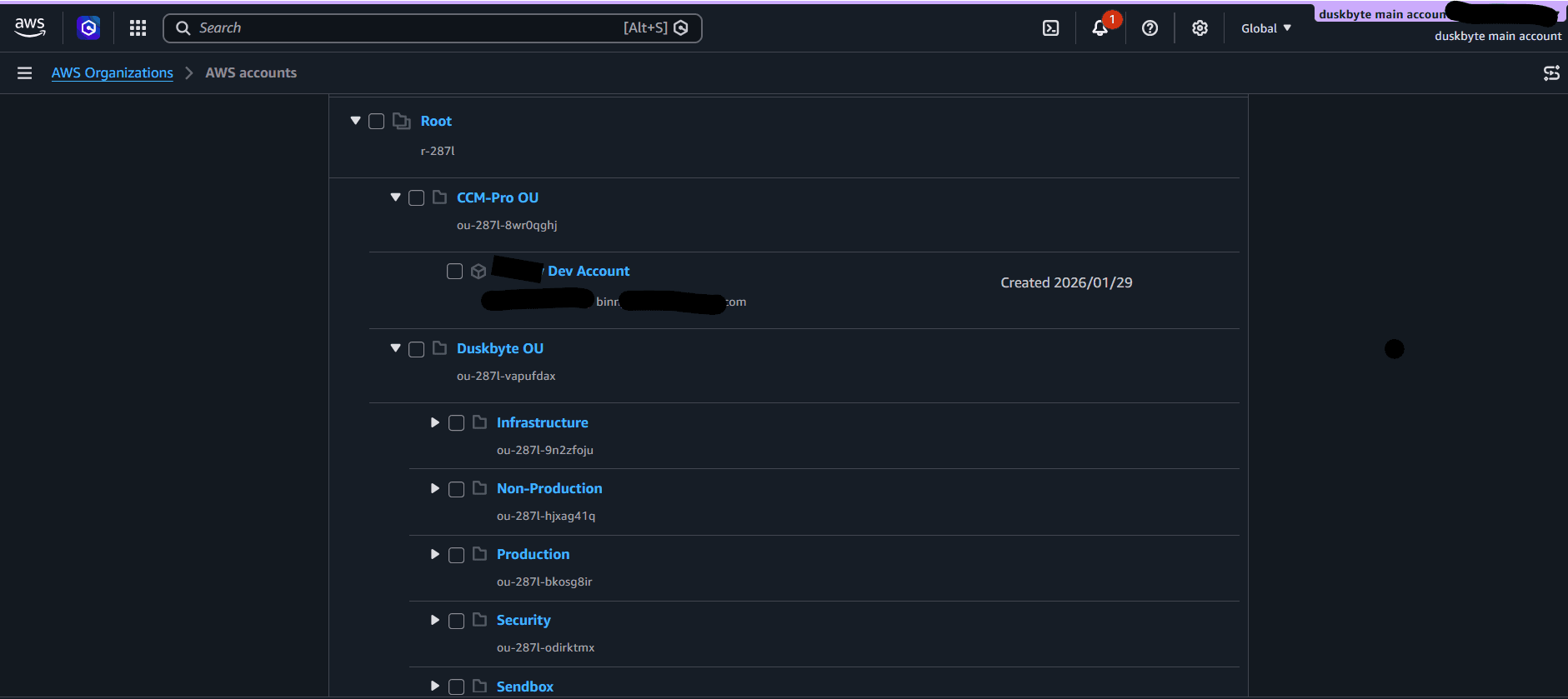
Our AWS Organization. Client names and account emails redacted.
This is the structure we ask for on every AWS engagement, whether that is Pricing-hub.co.uk, which pulls prices from 100+ supplier sources for 50 distributors on AWS EKS, or a two-year migration of dozens of applications and databases to modern stacks including AWS, delivered through a prime contractor.
So far, so standard. Here is what the standard advice leaves out.
Gap one: a member account still has a root user
Creating a member account and emailing the partner an invitation means the partner initialises the account with root credentials. Root can do anything inside that account, including the things you would least like an outside party to do: turn off CloudTrail, delete backups, or move a workload to a region you never agreed to.
You are paying for that account. You should hold root, not the partner.
AWS now lets the management account manage root access centrally. Enable it, and member accounts created afterwards have no root password, no root access keys and no root MFA device at all. For accounts that already exist, you can remove those credentials from the management account. The partner then works entirely through IAM roles you granted, and root sits with you for the rare privileged task that needs it.
If your partner pushes back on this, ask why. A team that only wants the access it needs will not.
Gap two: nothing stops a well-meaning mistake
Root or not, an account owner with AdministratorAccess can still disable logging by accident, or run up a bill in a region nobody watches. Service Control Policies close that door at the Organization level, above anything the account itself can change.
Put the partner accounts in their own Organizational Unit and attach two SCPs to it.
The first protects your audit trail:
{
  "Effect": "Deny",
  "Action": [
    "cloudtrail:StopLogging",
    "cloudtrail:DeleteTrail",
    "cloudtrail:UpdateTrail",
    "config:DeleteConfigurationRecorder",
    "config:StopConfigurationRecorder"
  ],
  "Resource": "*"
}
The second pins the account to the regions you actually use, with a NotAction list for global services such as IAM, STS, Route 53, CloudFront and Support, and a condition on aws:RequestedRegion. AWS publishes a ready-made version in the Control Tower documentation. Copy it rather than writing your own.
Two more worth adding: deny leaving the Organization (organizations:LeaveOrganization), and deny changes to the SCP-related roles you rely on. Together these mean the partner can build whatever they need inside the fence, and cannot move the fence.
Gap three: how the partner's pipeline logs in
The partner will deploy from CI. The lazy way is an IAM user with an access key pasted into GitHub or GitLab secrets. That key never expires, it is copied into every runner that needs it, and it outlives the engagement unless someone remembers to rotate it.
The better way takes about twenty minutes. Register your CI provider as an OIDC identity provider in the partner's account, create a deployment role, and write a trust policy that only lets it be assumed by a specific repository and branch:
"Condition": {
  "StringEquals": {
    "token.actions.githubusercontent.com:aud": "sts.amazonaws.com"
  },
  "StringLike": {
    "token.actions.githubusercontent.com:sub": "repo:your-org/your-app:ref:refs/heads/main"
  }
}
The pipeline exchanges a short-lived token for temporary credentials on every run. There is no secret to leak, and switching partners means changing one line in the trust policy.
For humans, use IAM Identity Center rather than IAM users. Each engineer on the partner side signs in through single sign-on, with a permission set you control and can revoke in one click. When someone leaves the partner's team, they lose access the same day, and you did not have to ask.
What this looks like from the partner's side
At DuskByte we ask clients to set this up before we touch anything, and we walk them through it if they have not done it before. It protects the client, and it protects us: an audit trail that cannot be switched off is the best defence a contractor has when something goes wrong that was not their doing.
The order we recommend:
- Create the Organization and an OU for partner accounts.
- Enable centralised root access management, then create the member accounts.
- Attach the CloudTrail, region and leave-Organization SCPs to the OU.
- Set up IAM Identity Center with one permission set per role.
- Add an OIDC provider and a deployment role for CI.
- Only now send the partner their sign-in link.
None of this is exotic. It is the same layering AWS recommends for its own multi-account guidance, applied to the one situation where it matters most: an outside team with write access to production.
The trust question nobody writes down
Separate accounts are often described as a security measure. They are really a trust measure. The right structure lets you extend trust in small, reversible steps: an account, then a role, then a permission set. It also lets a good partner prove they deserve it, because every action is attributable and every grant is revocable.
If the partner you are evaluating asks for root, or for a single admin user they can share, that is a signal about how they work. If they ask for a role with the least privilege that gets the job done, that is a better one.