
AI should be introduced into production systems carefully, as it changes system behavior, adds risk, and creates new dependencies. Instead of treating AI as a simple feature, teams should focus on improving specific workflows with controlled, reversible steps. Start with low-risk, assistive use cases, keep AI outside critical paths, and ensure strong boundaries for data, permissions, and validation. Successful adoption depends on phased rollout, observability, human oversight, and maintaining trust, stability, and cost control.
AI features can create real value inside enterprise software. They can reduce repetitive manual work, improve support workflows, surface operational context faster, and help teams move through complex information with less friction.
But in a live SaaS platform, AI is almost never just another feature.
It changes runtime behavior. It introduces new dependencies. It adds non-deterministic outputs to workflows that may previously have been deterministic. It creates new cost patterns, new security questions, and new operational failure modes.
That is why the real challenge is not prompt design. It is production design.
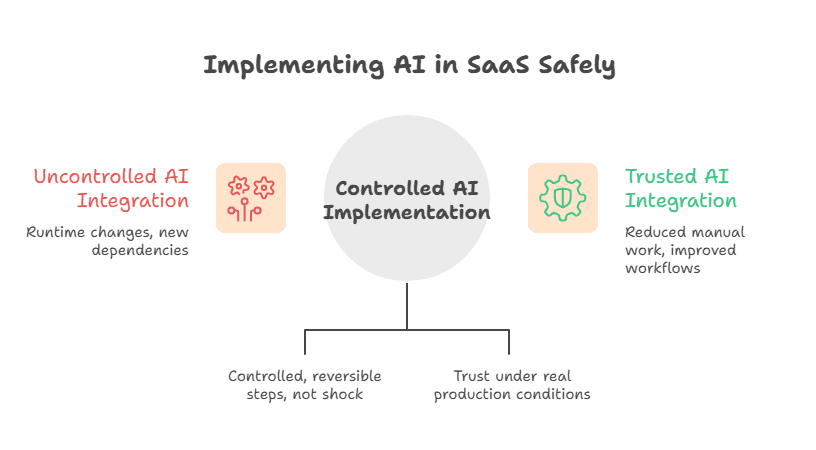
For teams operating live systems, the question is not whether AI is useful in principle. The question is whether it can be introduced in a way the platform, the team, and the customer can continue to trust under real production conditions.
That framing matters. It is the same reason enterprise teams modernize in phases rather than reaching for big-bang change. As we explain in Enterprise SaaS Modernization, stable systems evolve best through controlled, reversible steps—not architectural shock.
The same discipline applies to AI.
AI Is a System Change, Not a Feature Shortcut
A lot of AI efforts start with the wrong assumption: that once the model is good enough, the rest of the system will absorb it.
In production, that assumption breaks quickly.
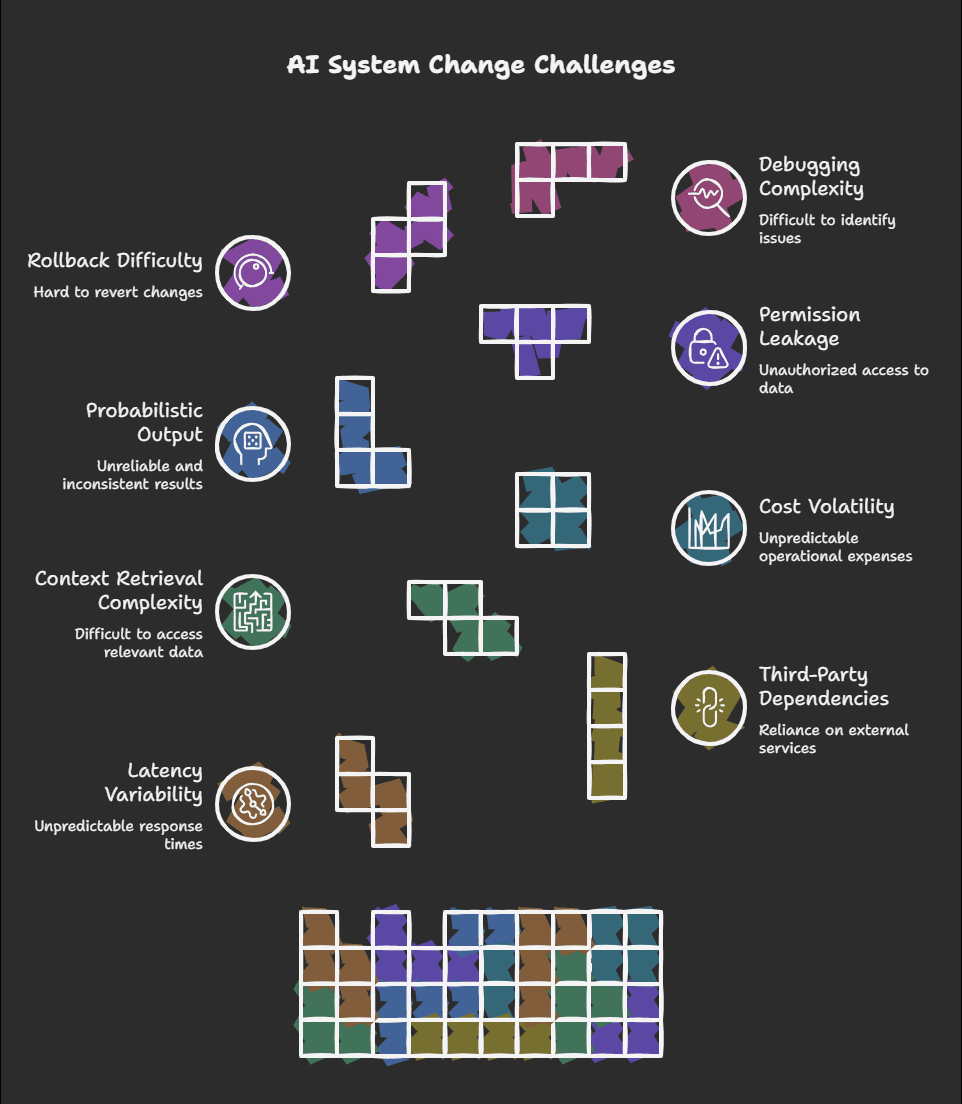
AI rarely destabilizes a platform because a demo looked weak. It destabilizes a platform because the surrounding system was not designed to handle what AI changes:
- latency variability
- third-party inference dependencies
- context retrieval complexity
- cost volatility
- probabilistic output behavior
- permission leakage risk
- more difficult rollback and debugging paths
This is why teams should treat AI rollout as a modernization problem, not a novelty problem.
If the platform already has fragile deployments, weak observability, inconsistent permissions, or tightly coupled workflows, AI usually amplifies those weaknesses instead of solving them.
That is also why many of the same warnings that apply to full rewrites apply here. As we discuss in Why Most SaaS Rewrites Fail (and What to Do Instead), ambition is not enough. Systems fail when complexity and operational risk are underestimated.
AI is no exception.
Start With the Workflow, Not the Model
The wrong question is:
How do we add AI to the product?
The better question is:
Where can AI improve a workflow without increasing operational, architectural, security, or compliance risk beyond what the business can tolerate?
That shift pulls the conversation back to engineering reality.
Before building anything, define the workflow clearly:
- What user or team is being helped?
- What happens if the result is wrong?
- What happens if the result is late?
- What happens if the AI subsystem is unavailable?
- Is the feature advisory, assistive, or directly automating an outcome?
- What data is required, and which boundaries must remain intact?
If those answers are still vague, the system is not ready for production rollout—no matter how promising the prototype appears.
This is where assessment matters. Duskbyte’s How We Work approach begins with diagnosis before execution for exactly this reason: production risk becomes manageable only when the workflow, dependencies, and blast radius are clearly understood.
The Safest First AI Use Cases
Not every AI use case carries the same production risk.
The safest early deployments usually share a few traits. They are:
- assistive rather than fully autonomous
- reversible rather than authoritative
- isolated from core transaction paths
- visible to human users before action is taken
- useful even when confidence varies
- able to fail without breaking the underlying workflow
In practice, the safest early AI features often include:
Draft Generation
Suggested replies, internal notes, summaries, knowledge drafts, or first-pass content generation.
These are safer because the user can review the output before acting on it.
Search and Retrieval Assistance
Helping users find the right documents, account history, case notes, technical guidance, or policy material faster.
These are safer because the system is surfacing context rather than silently taking action.
Internal Support and Operations Tooling
Case summarization, ticket enrichment, workflow triage, or internal guidance for support and operations teams.
These are safer because internal teams can judge usefulness before the output reaches customers.
Workflow Triage
Classification, routing, tagging, or prioritization with confidence thresholds and override options.
These are safer because the AI influences the flow without becoming the final decision-maker.
By contrast, higher-risk first deployments are usually the ones that directly affect:
- customer communications without review
- compliance or regulatory workflows
- pricing or billing logic
- approval systems
- security or entitlement behavior
- irreversible state changes
Those use cases may still become appropriate later. They just should not be treated as casual entry points.
The Fastest Way to Create Instability: Put AI in the Critical Path Too Early
One of the most common production mistakes is inserting an AI call directly into a mission-critical request path before the surrounding architecture is ready.
That often looks like:
- synchronous LLM calls during dashboard loads
- AI generation inside save or submit actions
- real-time multi-system retrieval during customer transactions
- model output feeding downstream processes without validation
The result is predictable:
- user-facing latency rises
- timeout behavior becomes harder to predict
- third-party dependency failures become visible to customers
- retries multiply both cost and failure complexity
- debugging becomes slower because the behavior is probabilistic
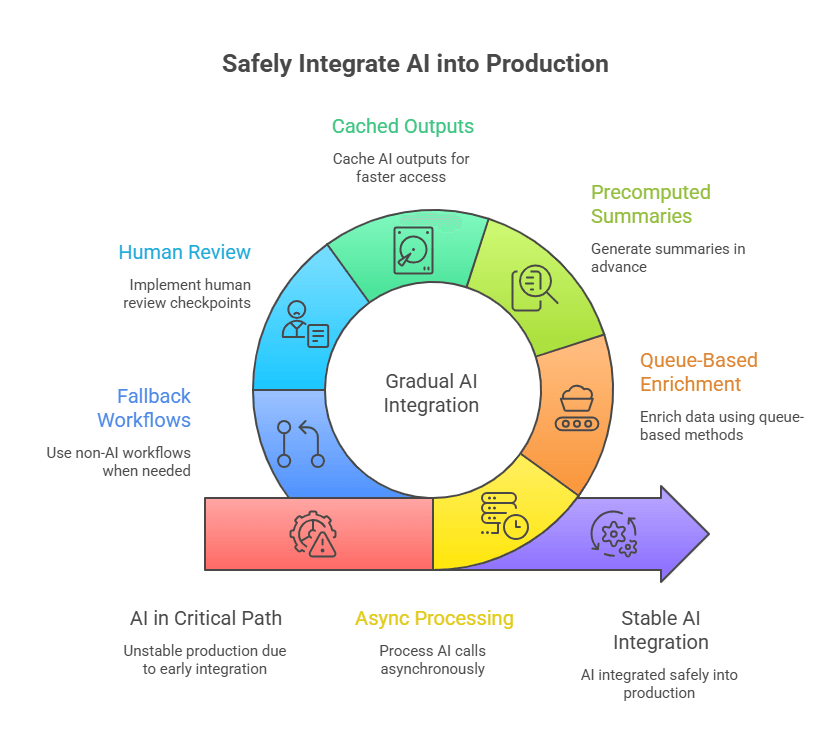
A safer design keeps AI off the critical path until the system has earned the right to place it there.
That usually means preferring:
- async processing
- queue-based enrichment
- precomputed summaries
- cached outputs where useful
- human review checkpoints
- fallback to non-AI workflows when needed
This is the same sequencing logic behind Crawl–Walk–Run: A Risk-Aware Way to Modernize Enterprise Platforms. You do not begin with full operational dependence. You begin with bounded change, controlled feedback, and clear rollback.
Build a Bounded AI Architecture
AI features become dangerous when they are implemented as shortcuts across platform boundaries.
A rushed implementation often lets the model talk too directly to application data, assemble context from multiple sources without enough discipline, and blur the boundary between generated output and system truth.
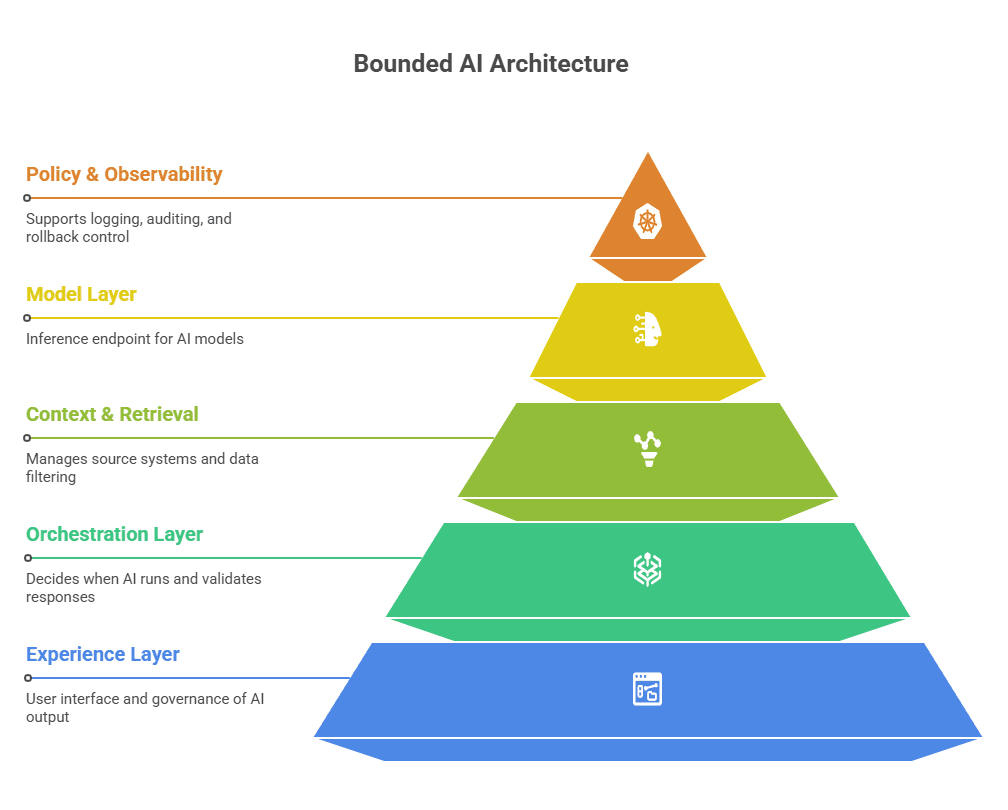
A safer pattern is a bounded architecture with distinct responsibilities.
1. Experience Layer
This is the product surface: the user interface, workflow touchpoints, review controls, status messages, and fallback states.
Its job is to make generated output understandable and governable.
Users should be able to tell:
- what is system fact
- what is retrieved source context
- what is AI-generated synthesis
- what still requires review or approval
2. Orchestration Layer
This is the service layer that decides when AI should run, what context is valid, what policy rules apply, and how responses are validated before they influence the workflow.
This layer matters because it prevents the model from becoming the application.
3. Context and Retrieval Layer
This is where source systems, indexing, metadata filtering, permission logic, provenance, and freshness rules live.
In many enterprise systems, this layer matters more than model choice.
4. Model Layer
This is the inference endpoint: external model provider, managed platform, or internal model.
It should be treated as replaceable infrastructure—not as the location of business logic.
5. Policy, Audit, and Observability Layer
This layer supports logging, redaction, evaluation, cost tracking, incident review, and rollback control.
Without it, teams can tell that the feature ran, but not whether it behaved acceptably for the business.
This bounded model also aligns closely with Duskbyte’s service approach in Automation, Integrations & Applied AI: automation and AI should be introduced where system stability and data quality allow, with monitoring, fallback paths, and phased adoption from the start.
Separate Facts From Generated Content
A subtle but damaging production mistake is letting generated output blend invisibly into authoritative application data.
That creates trust problems for users and audit problems for the business.
A production-safe design should make it easy to answer:
- What original data did the system use?
- What source material was retrieved?
- What did the model generate?
- Was the output edited by a human?
- Did any downstream action rely on it?
A useful rule is this:
AI may synthesize context, but it should not silently redefine source truth.
This distinction becomes even more important in systems where output may influence customer communication, regulated workflows, operational decisions, or historical records.
Retrieval Quality Usually Matters More Than Model Hype
Many teams over-focus on model selection and under-focus on the quality of the context the model receives.
In enterprise systems, weak retrieval is often the real reason AI outputs fail.
When retrieval quality is poor:
- stale policies get treated as current guidance
- irrelevant records pollute the response
- the model fills in missing gaps with invented confidence
- tenant or permission boundaries are put at risk
- users lose trust quickly because the mistakes are obvious
A more stable retrieval architecture usually includes:
- approved source systems by workflow
- metadata filters for tenant, role, freshness, and content type
- provenance links back to original source material
- chunking aligned to business meaning rather than arbitrary size alone
- explicit exclusion of superseded or restricted content
For many enterprise platforms, retrieval discipline creates more practical value than chasing the newest model release.
Put Permission Boundaries Ahead of Prompt Engineering
One of the most underestimated AI risks in production is access leakage.
Most SaaS products already have permissions that are difficult enough to enforce through conventional application surfaces. AI makes this harder because it can aggregate, summarize, and infer across datasets that were never meant to be casually combined.
Risky patterns include:
- retrieving across tenants in multi-tenant systems
- exposing internal notes to broader audiences
- surfacing archived or superseded policy content as live guidance
- blending role-restricted information into a generalized answer
- logging sensitive prompt content too broadly
A safe AI feature has to inherit the platform’s authorization model, not bypass it for convenience.
That means:
- permission-aware indexing
- context filtering before prompt assembly
- redaction rules for sensitive fields
- careful handling of logs and traces
- environment-specific controls for test versus live data
In many enterprise platforms, the real architectural challenge is not generating text.
It is preserving entitlements while generating text.
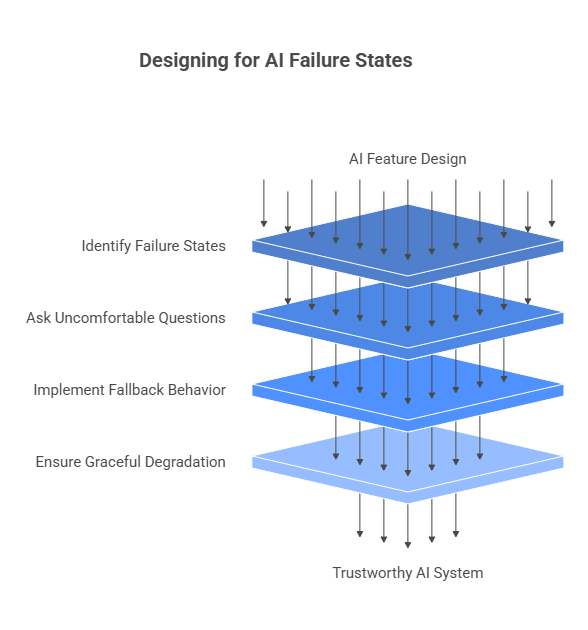
Design for Failure States From Day One
Most AI demos are built around the success path. Production systems need to be built around degraded states as well.
Ask the uncomfortable questions early:
- What happens when the model provider is slow?
- What happens when retrieval returns weak context?
- What happens when the output is malformed?
- What happens when a safety layer blocks the response?
- What happens when the feature exceeds cost thresholds?
- What happens when confidence is low?
A mature feature has fallback behavior, such as:
- returning source material instead of a synthesis
- allowing the workflow to continue manually
- queuing a request for later completion
- disabling the feature above quality or latency thresholds
- routing low-confidence cases to human review
Graceful degradation is not a luxury. It is part of what keeps trust intact when real production conditions are less cooperative than the prototype.
Do Not Let AI Write Directly Into Core System State Too Early
In early and even intermediate stages, AI output should rarely write directly into authoritative system state without a validation layer.
This includes:
- status changes
- approvals
- billing actions
- workflow completion signals
- customer notifications
- database updates affecting downstream logic
Why? Because even strong AI outputs are still probabilistic outputs.
Safer patterns include:
- suggestion-first interfaces
- structured output schemas
- validation rules before commit
- human review for consequential outcomes
- explicit idempotency protections
- staged actions before irreversible changes
Automation may grow over time, but it should grow through evidence—not through optimism.
Introduce Structured Outputs Early
Free-form text looks impressive in demos and creates friction in systems.
Wherever possible, define outputs structurally, even if the final user experience remains conversational.
Examples include:
- labels or classifications
- extracted fields with schema validation
- confidence scores
- evidence references
- predefined summary sections
- explicit insufficient-context states
Structured outputs help because they make validation, monitoring, comparison, and rollback much easier. They reduce the amount of uncontrolled surface area in the workflow.
That is not anti-AI. It is pro-production.
Treat Evaluation as Product Infrastructure
AI features need evaluation discipline before they need scale.
Teams should test for more than “does this look good in a demo?” They should evaluate:
Functional Quality
Did it answer the task well enough to support the workflow?
Grounding and Safety
Was it based on valid, permitted source material?
Operational Fitness
What were the latency, retry, and cost patterns under realistic usage?
Workflow Impact
Did it actually reduce effort, or did it shift burden into human review queues?
A useful evaluation program often includes:
- representative workflow test sets
- edge cases and failure scenarios
- regression testing across prompt and model changes
- human review sampling
- telemetry tied to feature versions
- acceptance criteria defined by the workflow, not by excitement
Without this, teams do not scale capability. They scale uncertainty.
Release Control Is Part of the Architecture
If AI is entering a live platform, release controls should exist from day one.
That means:
- feature flags
- internal-only modes
- tenant-specific rollout controls
- role-based exposure
- percentage-based release stages
- kill switches
- fallback paths to non-AI operation
This is how teams create reversible change.
It also creates the conditions for learning safely:
- expose internally first
- test with narrow cohorts
- compare AI-assisted and non-AI workflow outcomes
- disable quickly when quality, cost, or latency drift outside acceptable bounds
This release discipline mirrors the broader delivery philosophy behind How We Work: diagnose, stabilize, validate, then expand.
Roll Out in Phases, Not in One “AI Launch”
Healthy AI adoption usually follows a phased progression.
Phase 1: Advisory Assistance
The system drafts, summarizes, retrieves, or recommends. Humans remain fully in control.
Phase 2: Workflow Influence
The system helps classify, triage, enrich, or prioritize work, with strong human oversight.
Phase 3: Bounded Automation
Narrow, low-risk actions are automated where validation, observability, and rollback are mature.
Phase 4: Broader Operational Integration
Only after evidence, policy maturity, and production trust should the feature influence more consequential workflows.
This is especially important for legacy and enterprise platforms. It keeps AI adoption aligned with platform reality instead of forcing an architectural shock into already-complex systems.
For teams still deciding whether the foundations are strong enough, the SaaS Modernization Readiness Checklist is a practical place to begin.
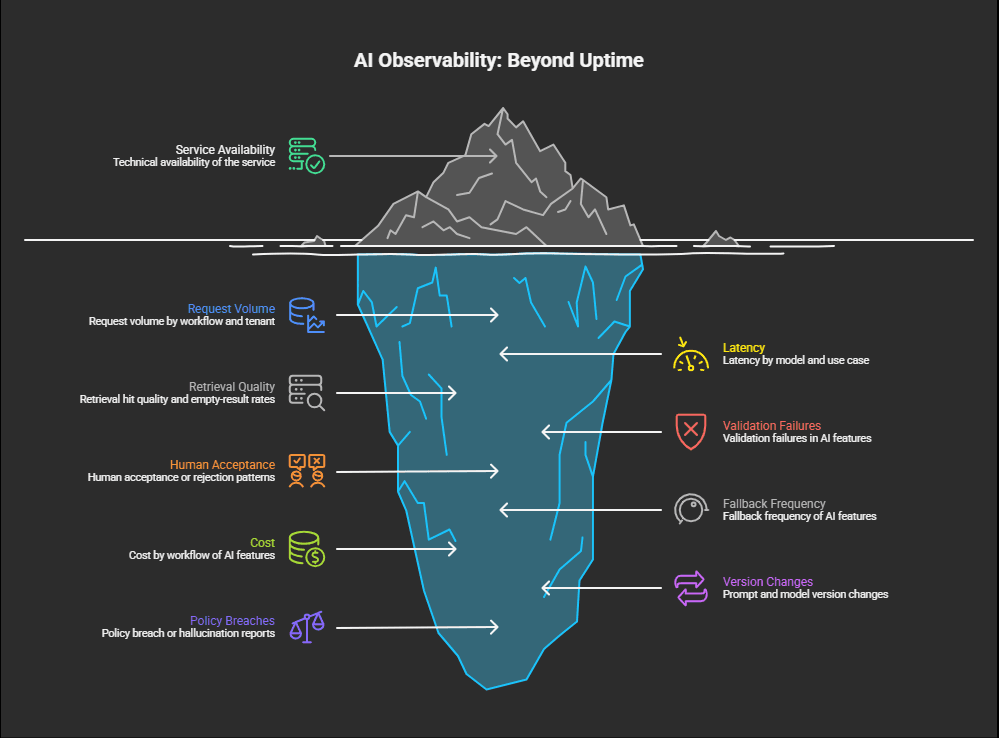
Observability Must Cover Trust, Not Just Uptime
Traditional monitoring is not enough for AI-enabled systems.
A service can be technically available while still failing the business.
Useful observability for AI features often includes:
- request volume by workflow and tenant
- latency by model and use case
- retrieval hit quality and empty-result rates
- validation failures
- human acceptance or rejection patterns
- fallback frequency
- cost by workflow
- prompt and model version changes
- policy breach or hallucination reports
The goal is not simply to know whether the feature ran.
The goal is to know whether it behaved acceptably for the business.
Treat Prompt Changes Like Code Changes
Prompt changes are not harmless copy edits.
A small change can alter:
- output structure
- tone and implied certainty
- cost per request
- parsing reliability
- safety behavior
- downstream workflow compatibility
That is why prompt changes should be versioned, reviewed, tested, and reversible.
For consequential workflows, prompt design is part of production logic.
Cost Stability Is Part of Production Stability
AI features often look cheap in limited prototypes and materially different at scale.
That happens because:
- real production context is larger than test context
- retries and reformulations add cost quickly
- concurrent usage is higher than forecast
- retrieval and storage layers introduce infrastructure overhead
- internal teams use successful tools more heavily than expected
Before broad rollout, teams should understand:
- cost per request
- cost per completed workflow
- cost by customer segment
- budget thresholds
- caching opportunities
- model tier fit by use case
Not every workflow needs the most capable model. Not every task needs real-time generation. Not every context bundle needs to be as large as technically possible.
A feature that “works” while creating uncontrolled cost pressure is not stable in any meaningful enterprise sense.
Human Review Is Not a Weakness
There is often pressure to present human-in-the-loop design as temporary.
In enterprise environments, that is usually the wrong instinct.
For many workflows, human review is the correct long-term architecture.
It is especially valuable when:
- customers are directly affected
- compliance interpretation is involved
- context is incomplete or ambiguous
- the cost of a wrong action is asymmetrically high
- trust matters more than automation volume
Good human review design includes:
- source visibility
- confidence or reason signals where appropriate
- easy accept, edit, and reject actions
- auditability of final decisions
- feedback capture for future evaluation
The goal is not to remove humans at all costs.
The goal is to place human judgment where it protects stability and trust.
Sometimes the Right Move Is to Prepare First
Not every platform is ready for AI rollout yet.
Sometimes the right conclusion is not “launch carefully.” It is “stabilize first.”
Warning signs include:
- weak data quality
- poor metadata hygiene
- inconsistent permissions
- fragile release processes
- limited observability
- workflows that are not actually well-defined
- teams attempting to use AI as a shortcut around unresolved architecture problems
In those cases, platform readiness work usually creates more value than pushing AI into production prematurely.
That same principle appears across adjacent modernization decisions. For example, When Cloud Migration Is the Wrong First Step explains why infrastructure change often amplifies risk when foundational architecture and operations are still unstable. AI behaves similarly.
Layering it onto weak foundations rarely creates calm systems.
For legacy environments specifically, the same logic carries into Legacy SaaS Modernization: stabilize first, isolate change, preserve uptime, and earn the right to expand.
A Practical Rollout Blueprint
For teams introducing AI into a live SaaS platform, a practical sequence usually looks like this:
1. Choose One Narrow Workflow
Pick something useful with a limited blast radius.
2. Map Risk Explicitly
Define data sources, permissions, latency expectations, failure modes, and rollback conditions.
3. Build the Orchestration Layer
Do not let the model connect directly to workflow logic without control points.
4. Bound Retrieval and Context
Limit source scope, enforce metadata rules, and preserve provenance.
5. Start With Human Review
Make outputs visible, editable, and traceable.
6. Add Telemetry and Evaluation
Measure quality, acceptance, latency, fallback behavior, and cost from the start.
7. Release Behind Flags
Expose internally first, then narrow customer cohorts, then expand only if the evidence supports it.
8. Expand Deliberately
Do not widen scope because the demo was compelling. Widen scope because production behavior proved reliable.
This may look slower than a broad “AI launch.” In practice, it is often much faster than recovering from avoidable trust failures, operational regressions, or compliance problems.
What Experienced Engineering Leaders Do Differently
The strongest engineering leaders do not rush to prove they are using AI.
They focus on introducing it in ways the organization can trust.
They understand that:
- a stable non-AI workflow is better than a fragile AI workflow
- retrieval quality often matters more than model novelty
- permission design is a first-class production concern
- graceful degradation protects trust
- evaluation belongs inside the product, not outside it
- rollout discipline matters more than launch messaging
Most importantly, they recognize that AI adoption is not just a feature initiative.
It is a system design decision.
And system design decisions should be held to the same standards as security, reliability, rollback, and data integrity.
Final Thought
AI can add meaningful value to enterprise SaaS products.
But that value does not come from bolting a model onto an unstable workflow and hoping the platform absorbs the change.
It comes from introducing AI in a way that respects production reality:
- live users
- bounded permissions
- operational risk
- audit expectations
- cost discipline
- rollback needs
- imperfect source data
- trust that takes time to earn
The real question is not:
How fast can we launch AI?
It is:
How do we add AI in a way the platform, the team, and the customer can continue to trust when production is under real pressure?
That is the standard that matters.
And for most enterprise systems, it is the difference between an impressive demo and a durable capability.
Related Reading on Duskbyte
- Automation, Integrations & Applied AI
- Enterprise SaaS Modernization
- Legacy SaaS Modernization
- SaaS Modernization Readiness Checklist
- Why Most SaaS Rewrites Fail (and What to Do Instead)
- Crawl–Walk–Run: A Risk-Aware Way to Modernize Enterprise Platforms
- When Cloud Migration Is the Wrong First Step
Frequently Asked Questions
Is it safe to add AI directly into customer-facing workflows?
It can be, but it is rarely the best starting point. The safer path is to begin with bounded, assistive workflows, preserve fallback behavior, and avoid placing AI directly inside mission-critical transaction paths until reliability and controls are proven.
What is the biggest technical risk when adding AI to an existing SaaS platform?
For most platforms, the biggest risks are not limited to hallucinations. They include weak retrieval, permission leakage, hidden coupling, unpredictable latency, and lack of graceful degradation when AI dependencies fail.
Should AI features be synchronous or asynchronous?
Early production rollouts are usually safer when AI processing happens asynchronously or outside the most critical request paths. Synchronous usage can still be appropriate in some cases, but only when latency, failure handling, and dependency risk are tightly controlled.
Is retrieval more important than model choice?
In many enterprise use cases, yes. If the system provides weak, stale, or unauthorized context, even a strong model will produce poor or risky output. Retrieval architecture often creates more practical production value than chasing the newest model release.
When should a company automate AI-driven decisions?
Only after the workflow is well-bounded, validation controls are in place, observability is mature, and rollback is reliable. For many workflows, human-in-the-loop review remains the right long-term design.
What should teams measure after launching an AI feature?
Teams should measure output quality, latency, acceptance rates, fallback frequency, retrieval quality, validation failures, cost by workflow, and any compliance or trust signals that show whether the feature is actually safe and useful in production.